Mar 09, 2026
5 Ways to Start Optimising Your Tour Company with AI and Automations
In Bold Studio, minimalism becomes a powerful tool for agencies to communicate clarity, elegance, and professionalism.

In Bold Studio, minimalism becomes a powerful tool for agencies to communicate clarity, elegance, and professionalism.
The more I get stuck in as a consultant the more I see that many companies are largely still running on manual processes, copy-pasting enquiries into spreadsheets, manually chasing reviews, sending the same follow-up email for the tenth time this week, and that is how it has always worked, but now we can change everything.
AI tools have become accessible enough that you don’t need a developer or a big budget to start using them. You just need to know where to begin.
If I was to say get started right now from 0, here are the five things I’d tell any tour operator to do.
Seems pretty obvious, but I really reccomend picking one model and sticking to it, this way you can learn how it works, it will learn context and you will be able to build better systems. Think of this as your digital thinking partner, somewhere you can ask questions, draft content, analyse data, and think through problems.
The two most popular options right now are ChatGPT (by OpenAI) and Claude (by Anthropic). Both are excellent. I am a Claude power user, I find Claude Co-work, code and all the offerings from Anthropic such as Skills, scheduled tasks to be extremely capable.
My recommendation: try both on a free tier and see which one feels more natural to you. The “best” model is the one you’ll actually use every day.
Start small. Ask it to rewrite your homepage copy. Have it draft a response to a difficult guest review. Use it to summarise a long supplier contract. Once you see what’s possible, your imagination will do the rest.
Tip: Once you hit a tone/style you like, tell the LLM, you can create Claude Projects or custom GPTS around these style guides so the model remembers and repeats. I wrote an article a while back on Custom GPTS for tour operators, you can find it here.
Automations have been around for a while, they used to be complicated but now you can prompt to create automations and flows. Zapier has co-pilot, where you ezplain what you want and it will create the automation template for you, all you need to do is connect your accounts.
Zapier is where I’d tell most operators to start. It’s the most beginner-friendly automation platform out there, and crucially, it has native integrations with tools that tour operators already use, including Bokun. That means you can connect your booking system to your email marketing tool, your CRM, your Slack, your spreadsheets, and more, without writing a single line of code.
A few simple automations worth building early:
When a guest submits an enquiry form → create a task in your CRM to follow up
When a new booking is confirmed in form your Reztech→ automatically add the guest to your email list
When a review comes in → get a Slack or email notification so you never miss it.
Below you can see a post I wrote on Jess, an AI agent I built with Bokun, Zapier & Zapier agents.
These aren’t glamorous. But they save hours every week, reduce human error, and free your team to focus on the experiences themselves, which is the bit that actually matters. If you want to dive deeper into automations you can see this article I wrote with some alternative platforms to also explore.
Most tour operators are sitting on a goldmine of data they never look at, seasonal booking patterns, where their best guests come from, which tour has the highest repeat booking rate, which channel drives the most revenue.
The problem isn’t the data. It’s having the time and know-how to make sense of it.
Here’s a simple workflow that works: export your data from Bokun, Rezdy, FareHarbor, or wherever you manage bookings, even a basic CSV works, put it into a folder on your desktop and work directly with the data inside Claude Cowork.
Then just ask questions in plain English.
“Which months are my slowest, and what patterns do you see?” “Which tour has the best revenue per booking?” “What’s my average lead time between enquiry and booking?”
Claude will analyse it and respond clearly. No Excel formulas. No pivot tables. No data analyst required. This is one of the highest-leverage things you can do right now, especially heading into planning season.
Next: Data stack, add more to your folder, Microsoft Clarity data, exported reviews, GA4 data, social analytics from Metricool . The more you feed the better. Just prompt well with guardrails so the model gives, tight clear responses back.
This one is slightly more advanced, but worth understanding, because it’s where AI goes from useful to genuinely transformative.
MCP stands for Model Context Protocol. In simple terms, it’s a way to connect AI models like Claude directly to your existing tools and data sources, your CRM, your inbox, your booking system, your documents, so the AI can actually read from and interact with them in real time. It isn’t that complicated, you can get connected directly through Claude
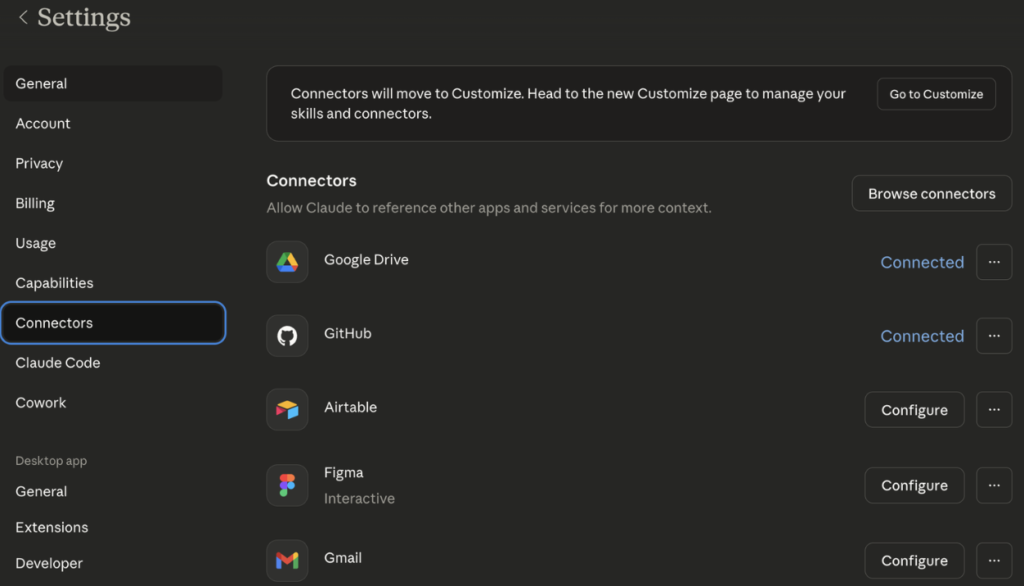
Without MCP, you’re copying and pasting information into Claude manually as I mentioned above with the booking data example. With MCP, Claude can pull the information it needs automatically, directly from the source.
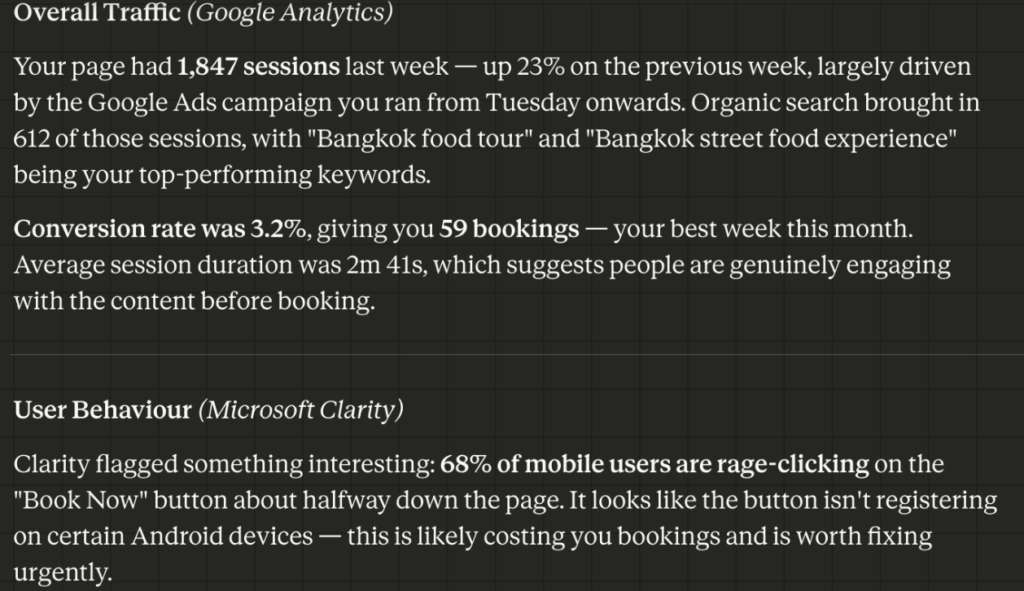
Heres an example, you ask: “How did my Bangkok Food tour landing page perform last week?”
Claude will be connected to Google analytics, Microsoft clarity, Google ads – it will the ngo away and provide you a response like this…
MCP is an open standard, which means it’s being adopted fast. You don’t need to build anything yourself to take advantage of it, many tools are already adding MCP support, and platforms like Claude are being built around it. Keep an eye on this. It’s going to change how operators manage their businesses. There is a shift to more advanced users using CLI etc right now, but right now Claude Connectors is perfect.
The final step is creating your own simple tools, and no, you don’t need to know how to code.
Vibe coding is a term that’s emerged recently to describe the practice of using AI to write code for you, based on a description of what you want to build. You describe the tool in plain English, the AI writes the code, you test it, iterate, and end up with something functional.
For tour operators, this could look like:
These aren’t full enterprise software products. They’re MVPs, minimum viable products, that solve a specific problem for your business. And for the first time, building them is within reach of non-technical operators. I recently wrote an article about this for Arival you can check it out below.
Tip: Start with one clear problem you want to solve. Describe it to a vibe coding platform such as Lovable. Ask it to build you a simple tool. You’ll be surprised what’s possible.
Warning: When it comes to Vibe Coding it is important to understand security, I always recommend keep any personal info/data off the front end of whatever you create or develop.
There are huge opportunities with existing tools right now, if you need to get started today. Pick a model (Claude etc), pick a automation tool – I recommend Zapier to get started.
Get your data, upload it into Claude, start exploring start asking questions. Learn by doing.
Same applies for Vibe coding, open Lovable, Claude and explain the product you want to create.